What Is the Zenerate App?
Zenerate is web-based real estate feasibility software designed for early-stage site planning and development analysis. The platform combines AI-powered layout generation with manual editing, financial pro forma analysis, and project exports, helping architects, developers, contractors, and commercial real estate professionals evaluate development opportunities within one connected workflow.
Teams can use the Zenerate App to create preliminary site plans and test fits, compare building layouts, adjust unit mix and parking, estimate revenue and construction costs, and evaluate metrics such as NOI, yield on cost, profit margin, and residual value.
The objective is not simply to produce one layout. Zenerate helps teams compare possible development scenarios and understand the trade-offs between design, density, parking, and financial performance. Explore Zenerate's plans and start a seven-day free trial.
How Does Zenerate Work?
The overall process can be summarized in four stages: Input, Generate, Edit, and Export. Here is how architects, developers, and other real estate professionals can use AI feasibility software for real estate development to move from an initial site to a decision-ready feasibility study.
1. Create and Define Your Site

Begin by creating and naming a new project. You can then locate the project site by entering an address or navigating directly to it on the map.
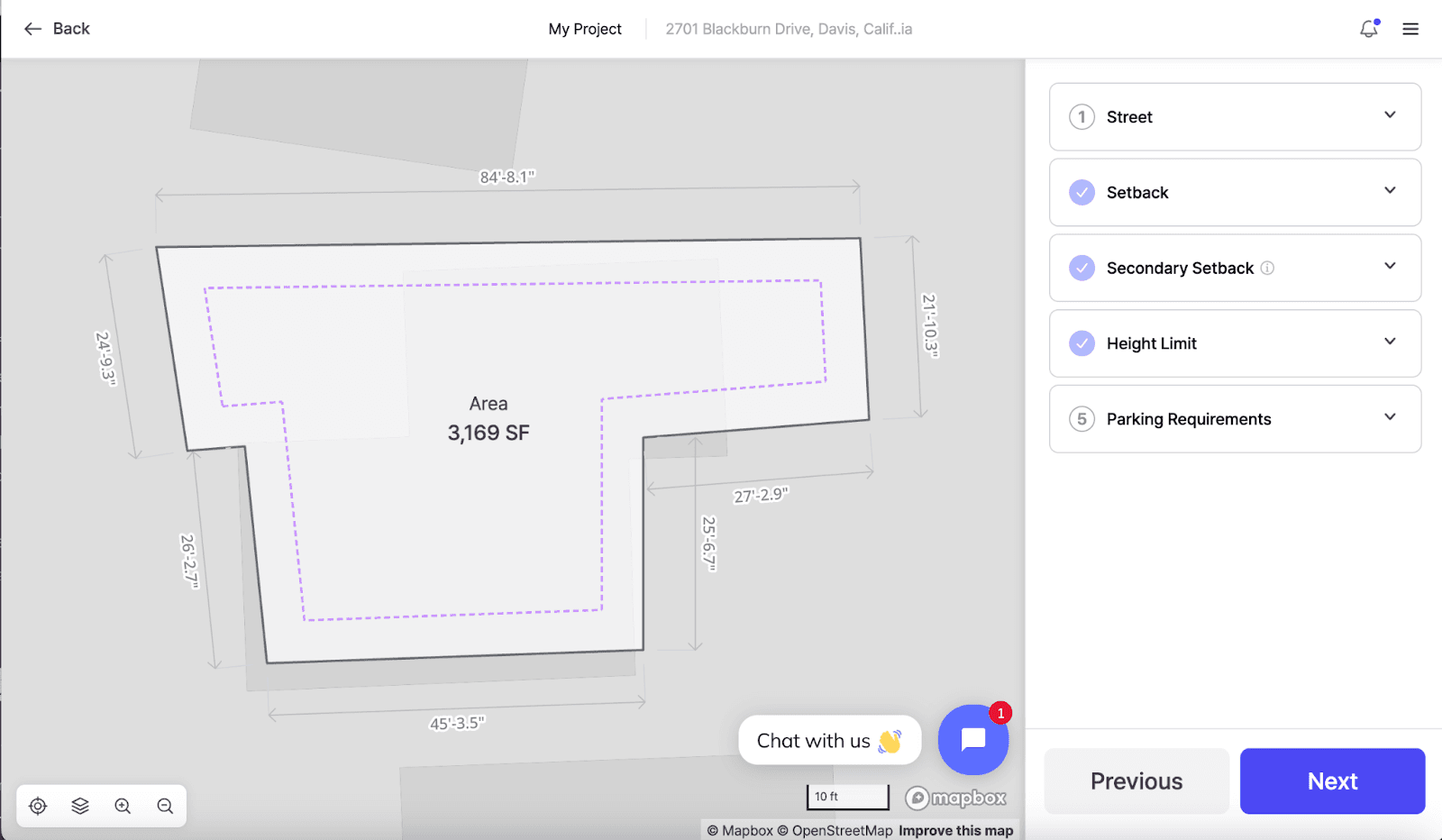
Once you have found the property, define the project boundary by selecting an available parcel, drawing a custom site boundary, or importing a CAD file containing the defined boundary.
Defining the correct project area is an important first step in any land development feasibility study. Parcel geometry, surrounding streets, access points, and site dimensions can all affect the layouts generated later.
For larger developments, Zenerate also supports multi-site project management and analysis. Learn more about this workflow in the latest Zenerate product update.

2. Enter Zoning and Project Requirements
After defining the site, enter the constraints and objectives that will guide the feasibility study. Important project inputs may include:
Street edges: Identify which sides of the site face a street.,Setbacks: Enter the required distances between the site boundary and the proposed development. Secondary setbacks can also be applied when necessary.,Height limit: Enter the maximum permitted building height or mark it as unknown if it has not been confirmed.,Parking requirements: Define parking ratios or minimum parking requirements for residential, retail, office, or mixed-use components.,Zoning information: Review available zoning data and adjust the project inputs to reflect the requirements of the site.,Development targets: Set objectives such as unit count, floor area ratio, number of floors, unit mix, or other project-specific goals.
These inputs help the platform generate options that respond to the project's physical and programmatic requirements. Zoning data and automated calculations should still be reviewed against the applicable jurisdiction, project documents, and professional guidance before making acquisition, entitlement, or investment decisions.
3. Generate Building Layout and Test-Fit Options
After completing the project setup, you can either create a layout manually or use AI Generate to produce multiple starting options. The AI layout tools use your site boundary, development targets, parking requirements, unit mix, and other project inputs to generate possible site plans.
Maximum unit count,Floor area ratio,Parking efficiency,Building placement,Open space,Unit mix,Overall site organization
Zenerate provides two AI generation workflows: Generate Here for quick exploration within the workspace and Create AI Solutions for saving and comparing multiple scenarios. Read Generate Here vs. Create AI Solutions for a detailed comparison.
Using an AI site plan generator at this stage can accelerate the initial test-fit process while still allowing the selected concept to be edited manually.

4. Edit and Refine the Design
Once you select a promising option, open it in the workspace and refine the layout based on the project's needs. Zenerate's editing tools allow you to modify the generated design rather than treating the AI result as a final answer.
Adjust building footprints and floor counts,Change unit layouts and unit mix,Add, remove, or reposition buildings,Edit cores, rooms, corridors, and other building components,Add structured or surface parking,Modify driveways and circulation,Define open space, amenities, wetlands, easements, and other zones,Adjust dimensions by entering values or dragging points and edges,Duplicate and reposition components,Create additional parcels or development areas
This combination of automated generation and manual control makes Zenerate useful as both test fit software and site planning software for architects and developers. For a larger-site example, see How to Create a Master Plan Site in Zenerate.
5. Analyze Physical and Financial Feasibility
A layout only answers part of the feasibility question. Teams must also understand how the proposed development performs financially. Within Zenerate, you can enter project assumptions and review:
Unit count and unit mix,Gross floor area,Floor area ratio,Parking count and parking ratio,Development revenue,Construction costs,Net operating income,Yield on cost,Profit margin,Residual value
Connecting the physical test fit with the financial pro forma makes it easier to compare multiple development scenarios. One option may produce more units, while another may offer better parking efficiency, lower costs, or stronger financial performance.
6. Export the Feasibility Study
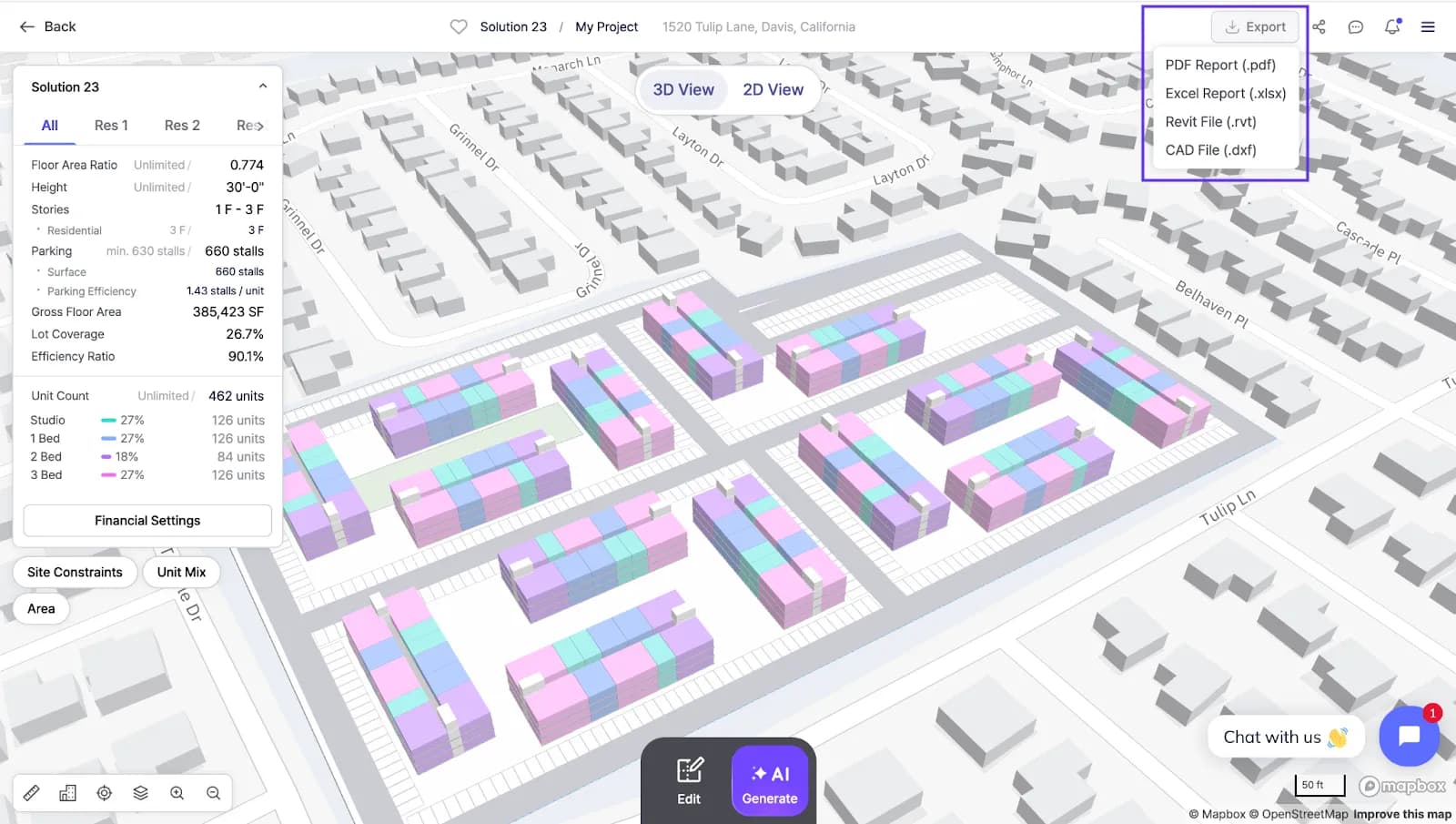
After refining the preferred option, export the project information in the format that best supports your next step:
PDF: Create a feasibility report containing project summaries, plans, area information, financial data, and other selected details.,Excel: Export project data for further financial analysis and documentation.,CAD: Export floor plans for continued work in AutoCAD and other compatible design software.,Revit: Export a 3D model for BIM and architectural workflows.
Zenerate also supports vector-based drawings in PDF reports, helping plans remain clear when users zoom in or take measurements in compatible PDF software.
Who Can Use Zenerate?
Zenerate is designed for professionals involved in early real estate planning and preconstruction, including:
Developers evaluating land acquisition and development potential,Architects producing early design studies and client test fits,Contractors and estimators reviewing building area and preliminary construction costs,Commercial real estate brokers demonstrating a property's potential to buyers,Land planners comparing density, parking, circulation, and site-use scenarios
Each group may use the platform differently, but the central purpose remains the same: creating and comparing development scenarios before the project advances into more detailed design.
Start a Real Estate Feasibility Study With Zenerate
Zenerate brings site planning, AI-generated building layouts, manual editing, financial analysis, and project exports into one feasibility workflow. Instead of relying on a single preliminary test fit, teams can evaluate multiple scenarios and compare how different planning decisions affect site yield and financial performance.
Explore Zenerate's plans and start a seven-day free trial, or request a demo to test the platform using a current project site.
For product questions or feedback, email product@zenerate.ai. For sales, pricing, or partnership inquiries, contact the Zenerate team.
Book Demo + Start a Free Trial