Site circulation plays an important role in early site feasibility analysis. For residential communities, master plan sites, and larger residential developments, driveways need to do more than connect buildings and parking areas. They also need to support vehicle movement, access, turning, and overall site organization.
Zenerate’s cul-de-sac and driveway corner controls give users more flexibility when editing site circulation directly in the workspace. Users can add or remove cul-de-sacs at eligible driveway endpoints, adjust inner and outer radii, align cul-de-sacs using reference points, and apply different corner rounding values for inside and outside driveway corners.
This tutorial explains how to use these controls to create clearer and more flexible driveway layouts during early site planning.
Step 1: Open Your Project and Review the Driveway Layout
Start by opening the project you want to edit.
Before adding a cul-de-sac or adjusting driveway corners, review the existing driveway layout in the workspace. Look at how the driveway connects to buildings, parking areas, site entrances, open space, and other circulation paths.
For larger sites, this step is especially important because driveway layout can affect building placement, parking efficiency, emergency access, and how residents or visitors move through the site.
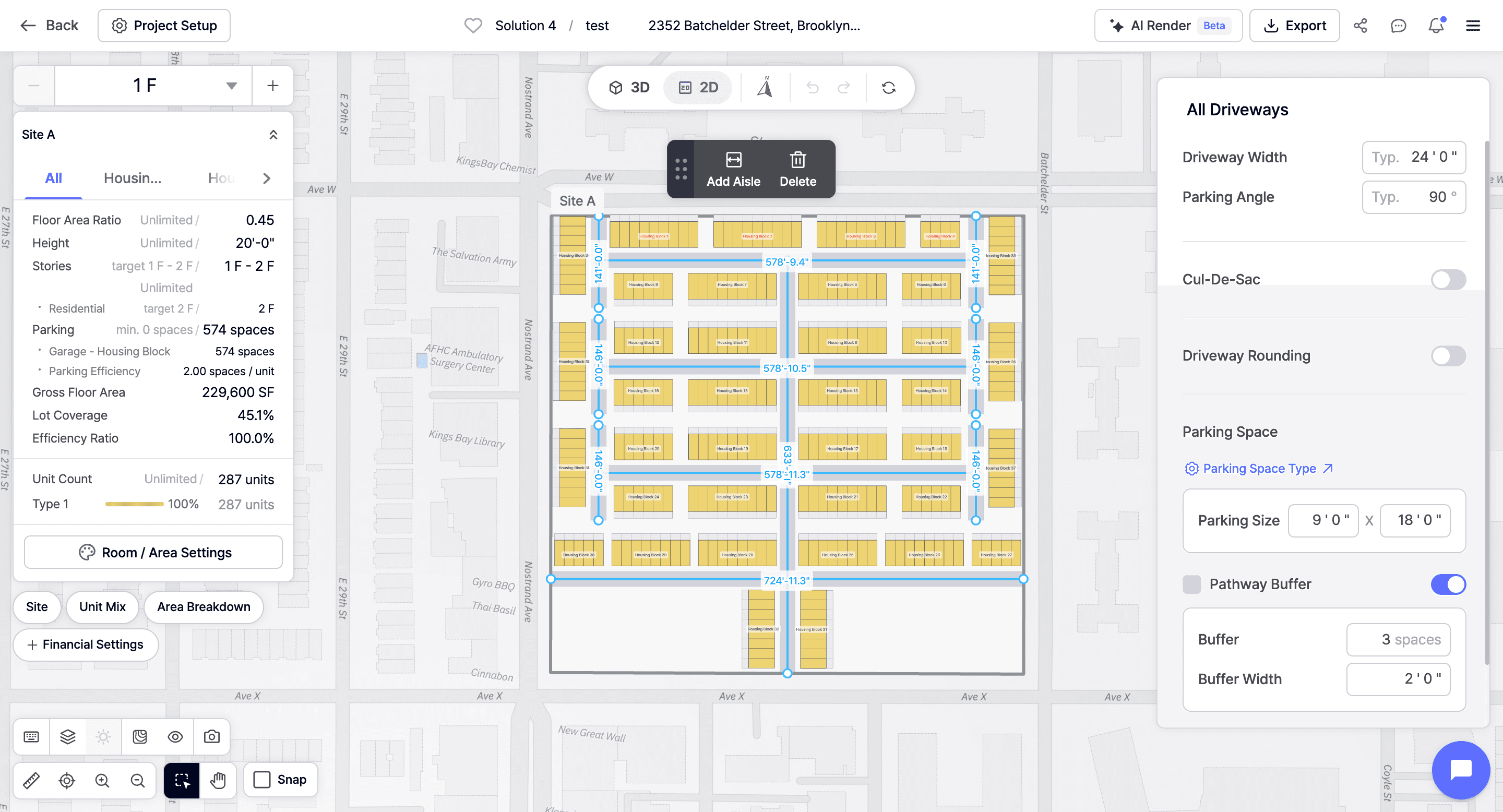
Circulation should be reviewed early because small changes to driveway geometry can affect building placement, parking efficiency, emergency access, and the overall site plan.
Step 2: Identify an Eligible Driveway Endpoint
Cul-de-sacs can be added to eligible driveway endpoints.
An endpoint is typically the end of a driveway segment where a turnaround condition may be needed. Once you identify the driveway endpoint you want to adjust, select the appropriate driveway or endpoint in the workspace.
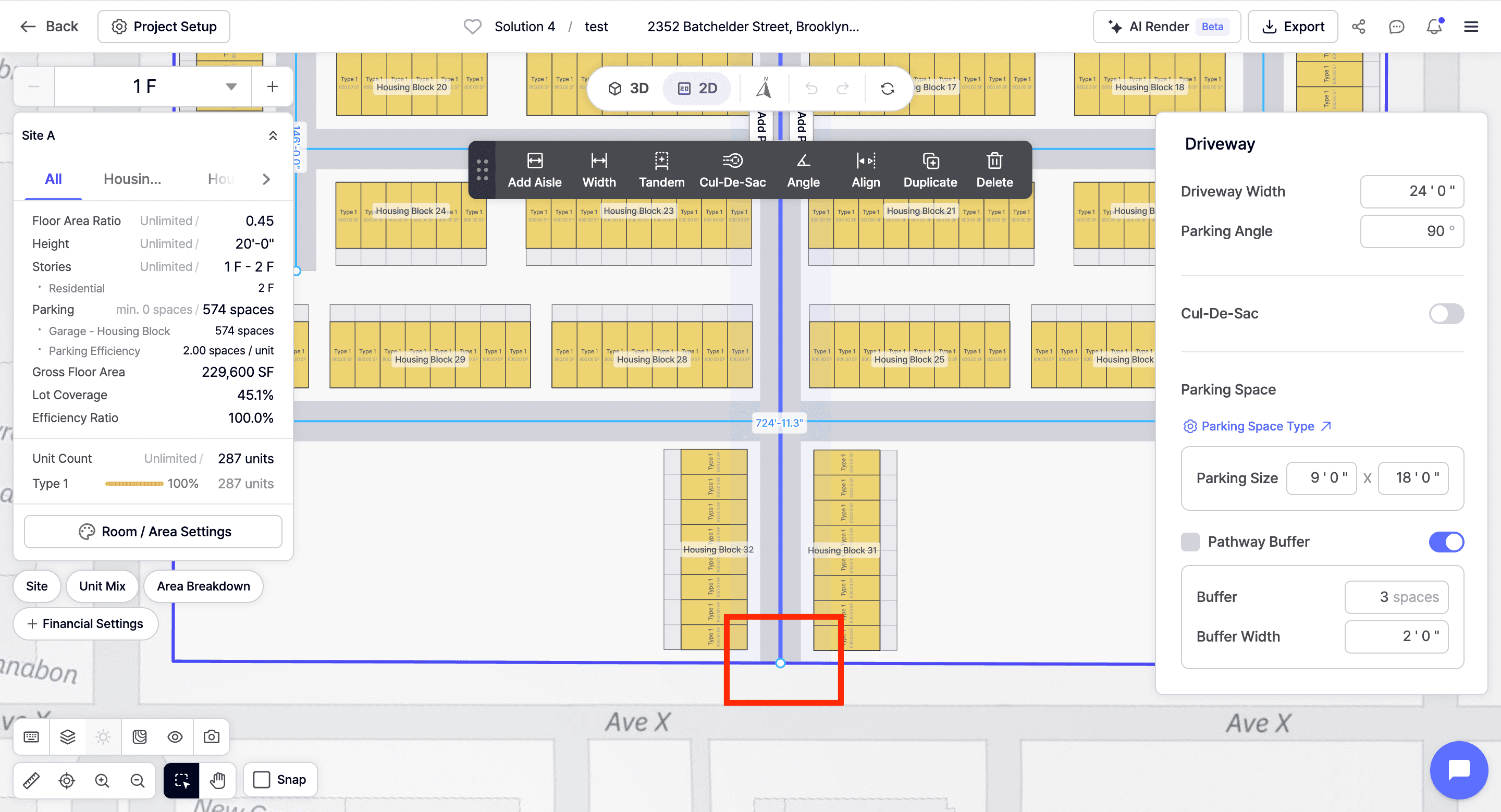
This is useful when a site plan includes a dead-end drive, internal residential street, or access route that may need a turnaround area.
For example, users may want to add a cul-de-sac when working on:
• Townhome communities
• Garden-style multifamily sites
• Master plan developments
• Suburban residential layouts
• Sites with internal driveways or private roads
Adding a cul-de-sac can help make the circulation strategy clearer during early test fit review.
Step 3: Add a Cul-de-Sac
After selecting an eligible driveway endpoint, add the cul-de-sac directly in the workspace.

Once added, the cul-de-sac becomes part of the driveway layout and can be adjusted based on the needs of the site. This allows users to create a turnaround condition without redrawing the entire circulation path.
This feature makes it easier to test different driveway configurations quickly. Instead of treating circulation as a fixed condition, users can adjust the driveway endpoint and immediately see how the cul-de-sac affects nearby buildings, parking, and open space.
Step 4: Adjust the Inner and Outer Radii
Once the cul-de-sac is added, users can adjust both the inner and outer radii.
The radius controls help define the size and shape of the cul-de-sac. The outer radius affects the overall turnaround area, while the inner radius can help control the internal shape or center area, depending on the desired driveway configuration.
Adjusting these values helps users test different circulation conditions and better fit the cul-de-sac within the available site area.

For example, users may need to adjust the radii to:
• Fit the cul-de-sac within the site boundary
• Maintain clearance from buildings or parking
• Improve vehicle turning movement
• Create a more efficient driveway layout
• Preserve more open space or amenity area
• Respond to project-specific circulation goals
During site planning, radius control gives users more precision when shaping the driveway system.
Note: You can also control the cul-de-sac alignment by clicking on the Align button.
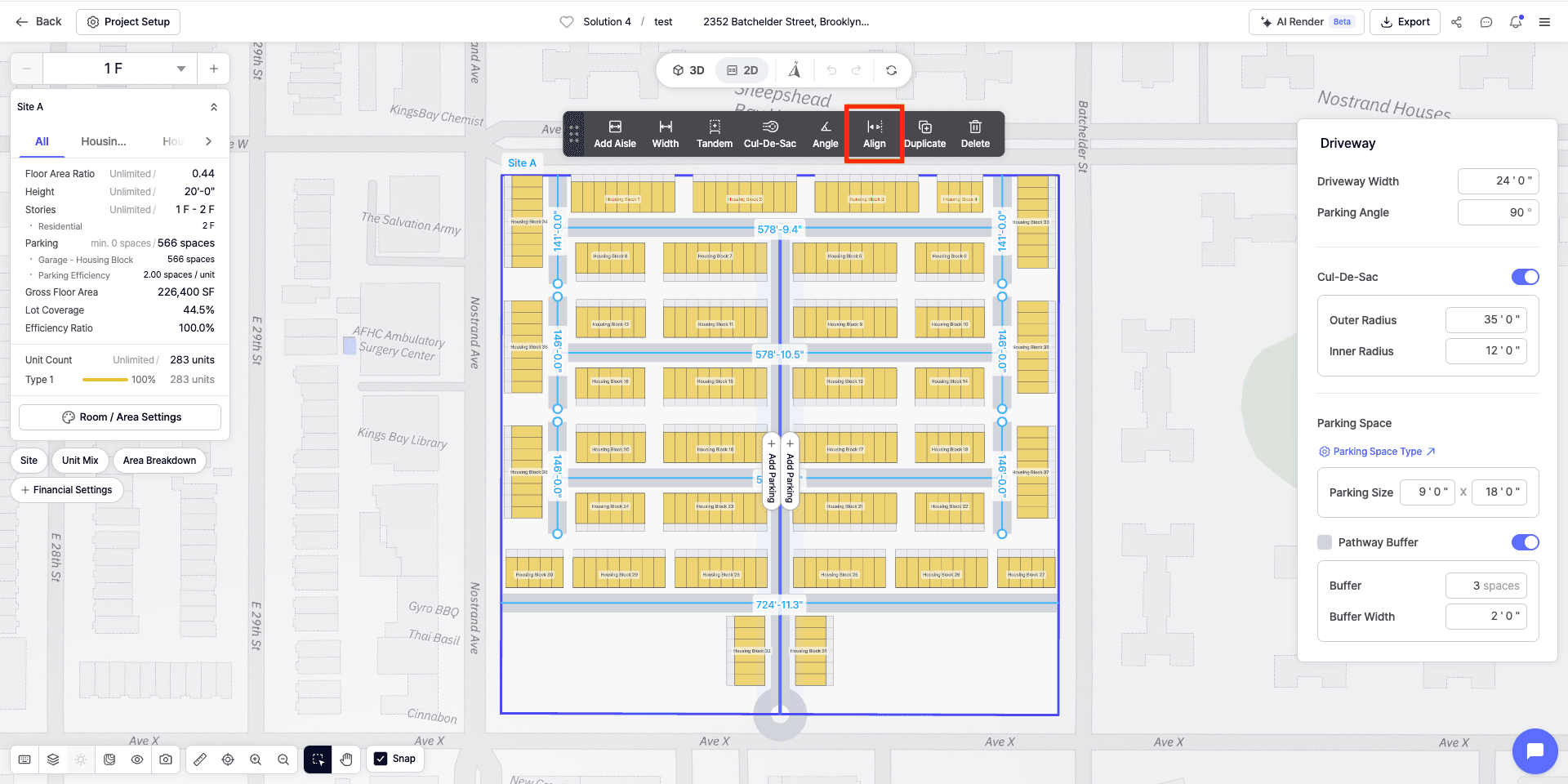
Step 5: Review How Driveway Controls Affect the Site Plan
After adjusting the driveway corners and adding your cul-de-sac, review the full site plan.

Corner radius changes may seem small, but they can affect nearby site elements. A larger corner radius may change how much room is available for parking, landscaping, open space, or building placement. A tighter radius may preserve space but could affect how the driveway reads visually or functions within the site.
During land development planning, these details can influence the overall quality of the plan. Driveway geometry affects more than circulation. It can also affect site efficiency, parking layout, amenity placement, and how clearly the project can be presented.
Review the updated layout to make sure the driveway corners, cul-de-sac, buildings, parking, and open areas work together.
Why Cul-de-Sac and Driveway Corner Controls Matter
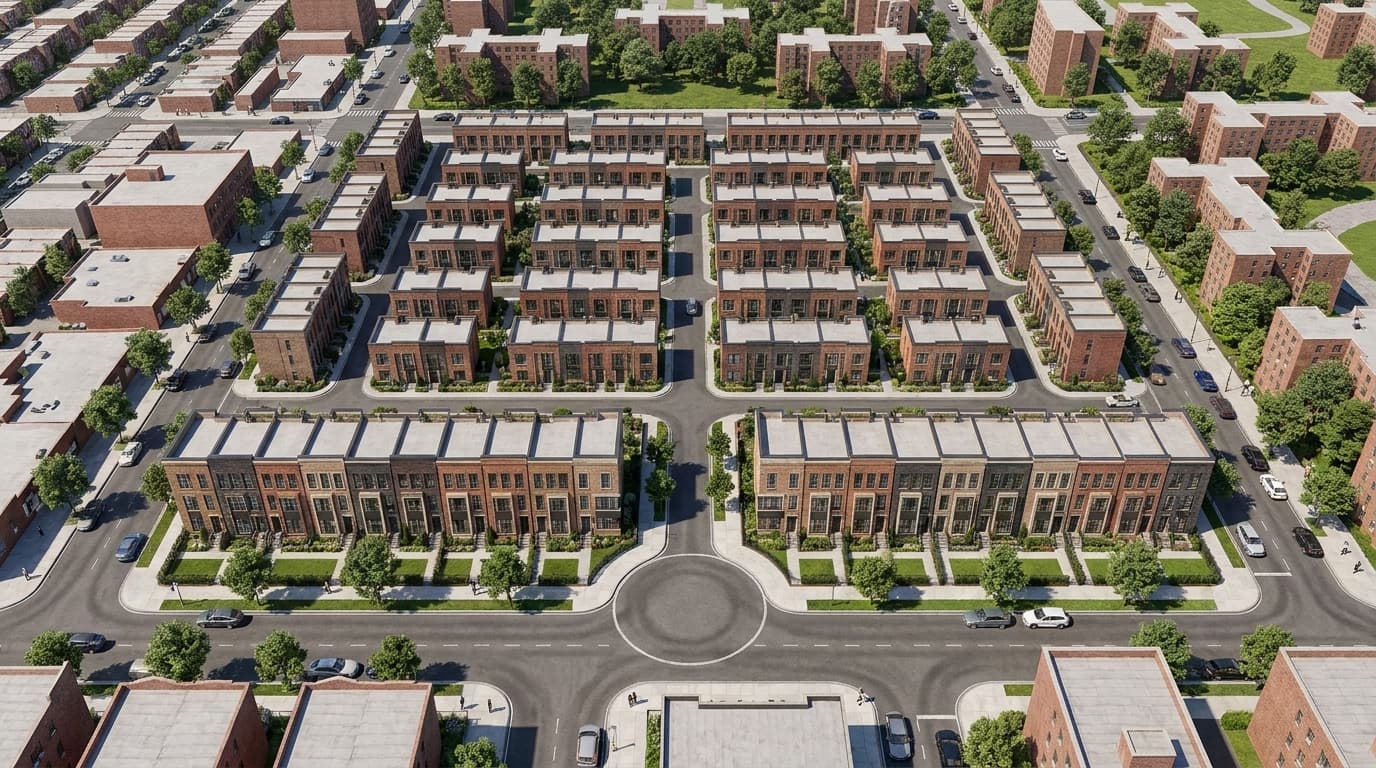
Driveway layout is an important part of early feasibility.
For many residential and master plan sites, circulation can influence whether the overall layout feels practical and well-organized. Cul-de-sacs, driveway endpoints, corner radii, and turning conditions all affect how a site functions.
Zenerate’s cul-de-sac and driveway corner controls give users more direct control over these details inside the workspace. Instead of treating driveway geometry as a fixed output, users can refine the layout as they continue developing the site plan.
This is especially useful for:
• Residential communities
• Townhome layouts
• Garden-style multifamily sites
• Master plan developments
• Suburban land development projects
• Early real estate feasibility study workflows
By editing cul-de-sacs and driveway radii directly, users can create more flexible and site-responsive layouts.
Final Thoughts
Zenerate’s cul-de-sac and driveway corner controls help users refine site circulation directly in the workspace.
Users can add or remove cul-de-sacs at eligible driveway endpoints, adjust inner and outer radii, align cul-de-sacs using reference points, and apply different rounding values for inside and outside driveway corners.
For developers, architects, and planners working through a development feasibility study, these controls make it easier to test driveway layouts, refine circulation, and evaluate how site access affects the broader plan.
By giving users more control over circulation geometry, Zenerate supports a more flexible and detailed site planning software workflow for early feasibility studies.
Explore What Zenerate Can Do
If you would like to discuss how Zenerate could support your feasibility or land development workflow, book a demo below to start the conversation.
Book a Demo + Start a Free Trial